

The app’s interface is in Spanish. Screens, tabs and buttons are named as they appear, with their English meaning.
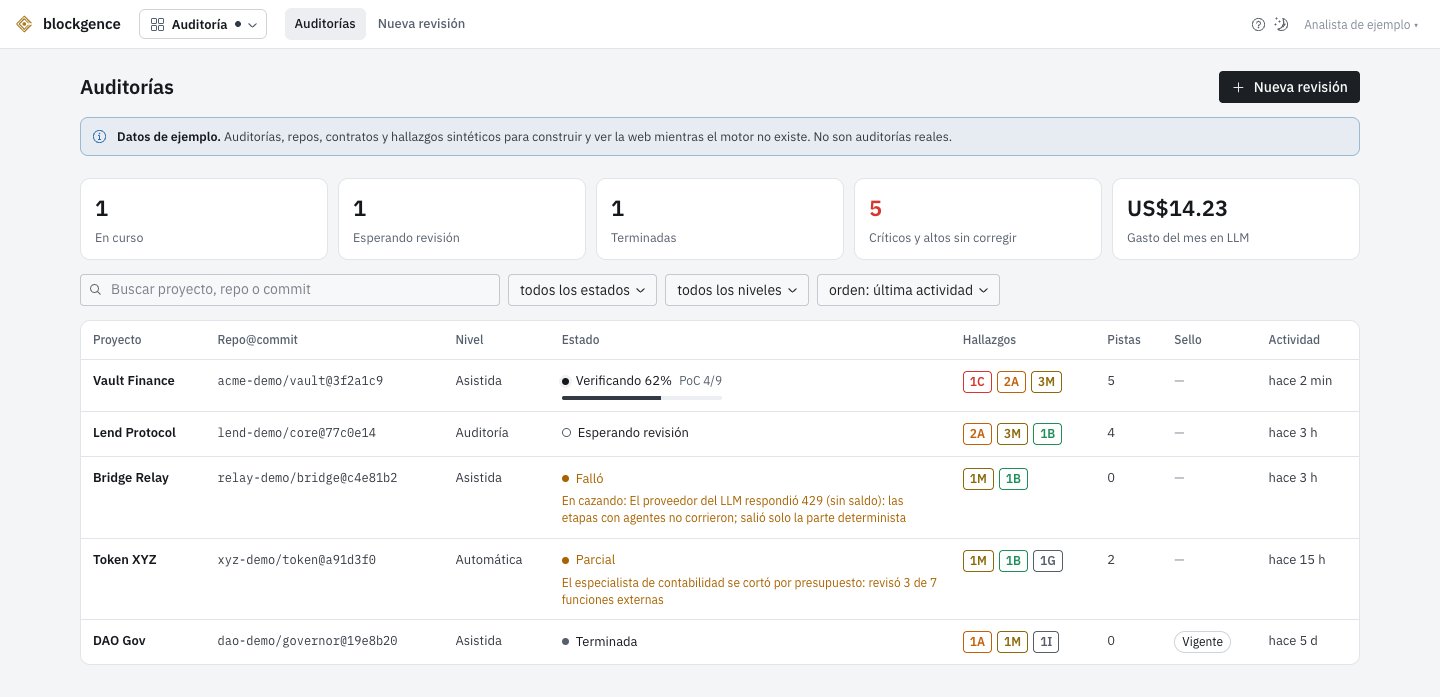
The audit dashboard, with the example audits.
Levels
The word “audit” only names what a person reviews. The automated review is not one.
Validation grades
Each finding says what proves it. The grade is assigned by a fixed rule, not by an agent.
Origin (who proposed it: an agent, a rule, a tool, a person) and grade (what proves it) are two separate
things: an agent’s hypothesis with a passing proof is G1.
Severity
Critical, High, Medium, Low, Informational and Gas.- Critical and High require G1, G2 or G3. A G4 finding about the code does not go above Medium.
- Control warnings about what is deployed are G4 with a fixed severity (see “Deployment and control”).
- A lead has no severity. It shows the severity it would have if proven, so you know where to look.
- A finding you mark as acknowledged keeps its severity.
Inside an audit
Each audit is an isolated space, like a case: everything inside belongs to that audit and to your organization. The top shows the project, the repo and commit, the level and the status of the run. Below are its sections:Resumen, Hallazgos, Pistas and Pruebas (summary, findings, leads and proofs)
Resumen, Hallazgos, Pistas and Pruebas (summary, findings, leads and proofs)
- Resumen (summary): the count by severity and grade, what it covered and what it did not, and the disclaimers.
- Hallazgos (findings): each with its grade, its location (file and line), the highlighted code, the description, the impact, the recommendation and its proof or citation.
- Pistas (leads): the unvalidated hypotheses, with the possible severity, in how many runs they appeared, the skeptic’s refutation if there is one and why they were not proven.
- Pruebas (proofs): the proofs of concept and fuzzing sequences, with the Foundry output and the balances before and after.
Mapa, Amenazas, Invariantes, Corrida and Revisiones (map, threats, invariants, run and reviews)
Mapa, Amenazas, Invariantes, Corrida and Revisiones (map, threats, invariants, run and reviews)
- Mapa (map): contracts, inheritance, entry points with their guards, roles, value flows and external calls, in a navigable diagram.
- Amenazas (threats): the threat model: assets, actors, dependencies, what would be catastrophic and which attack families were searched (and which were not, with the reason).
- Invariantes (invariants): the properties, with their status: broken (with the sequence), not broken, being verified or not exercised.
- Corrida (run): the stages and the agents, the budget used, each agent’s model and skills, the tokens and the cost.
- Revisiones (reviews): the history by commit and the comparison between two runs: fixed, new and still open.
Deploy y control, Sello and Notas (deployment and control, seal and notes)
Deploy y control, Sello and Notas (deployment and control, seal and notes)
- Deploy y control (deployment and control): the deployed addresses, the bytecode verification against the commit and the control report.
- Sello (seal): publishing the report, the live status of the seal and how to verify the signature.
- Notas (notes): your team’s notes on findings and leads.
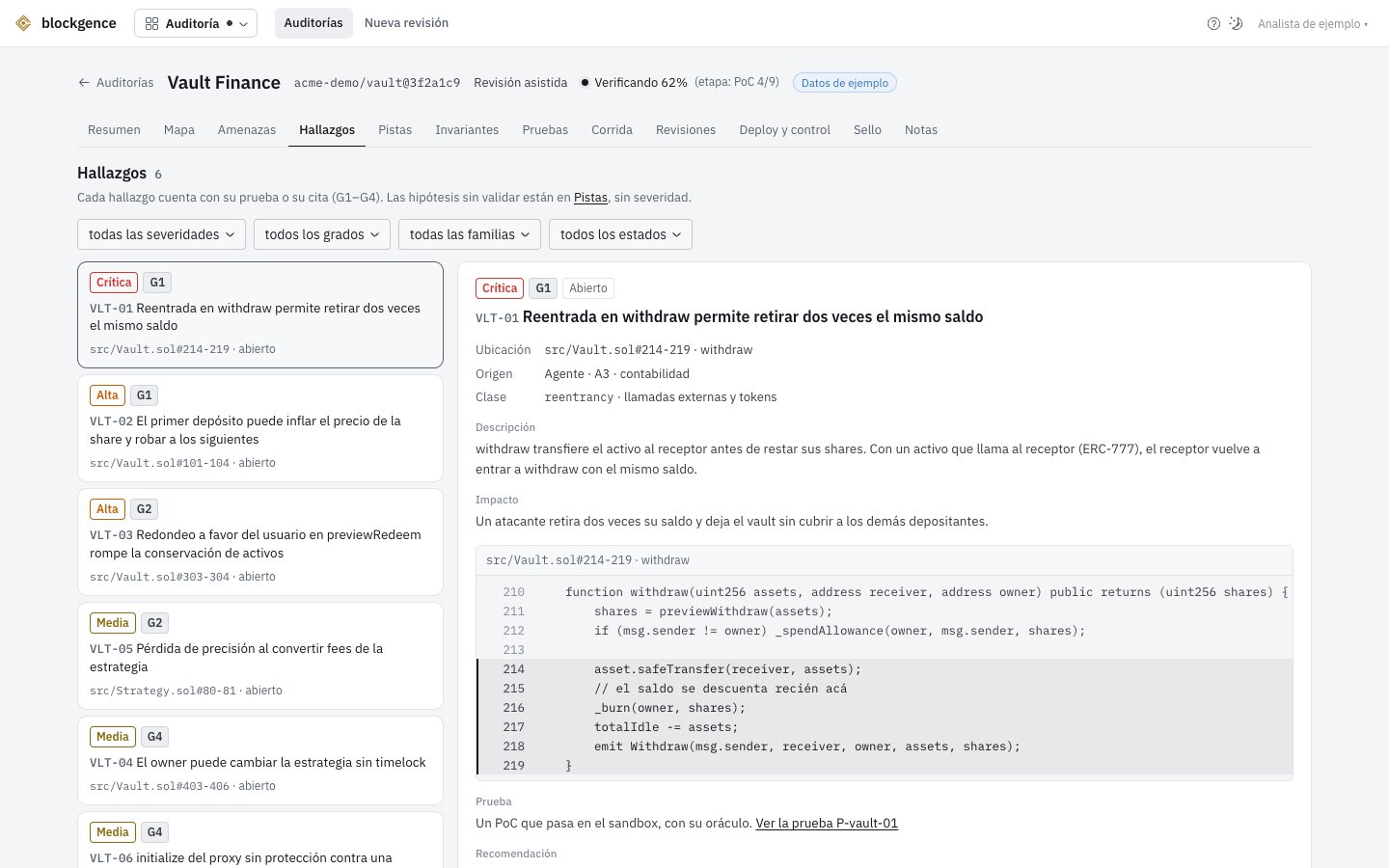
Findings of an example audit.
Request a review
1
The code
A public GitHub repo and the full commit hash (40 characters): the whole report refers to that commit, not to
a branch. Uploading a zip and private repos are not available yet.
2
The files in scope
By default,
src/ without tests, scripts or dependencies. You edit one path or pattern per line, and a leading !
excludes. Whatever is left out is not reviewed, and the report says so.3
The level and the specification
Pick the level. The specification is optional, except for an Audit: with it, the discrepancies between what the code
does and what it should do can be flagged.
Today the review stays queued and does not run (see the warning above). Requesting it does not charge credits.
Deployment and control
An audit is a snapshot of a commit. After the report, a contract can be exposed if something different is deployed, if keys or roles are misconfigured, or if there is an upgrade. This section covers those three things:- Bytecode verification against the reviewed commit: match, match except metadata or mismatch, with the first difference. For a proxy, the implementation is compared. Not available yet: an address you add stays “unverified”.
- Control report, from the
/v1/contractreading: who can upgrade the contract (the ProxyAdmin → Safe → timelock chain), who holds each power, and these warnings with a fixed severity:
A warning only comes from a fact in the reading. What the reading cannot decide (a minting cap, a timelock the admin
can bypass, a renounced role the specification says should exist) is declared as not evaluated.
Report and seal
The report is private by default. If you publish it, the seal is generated: a public page with the report, the commit, the addresses and their network, the Blockgence signature and an OpenTimestamps timestamp. The addresses are then watched with Watchtower, and the seal changes status:
Anyone can verify the seal without trusting the Blockgence website: download the report, recompute its sha256, check the
signature with the public key and the timestamp with OpenTimestamps. See
Methodology and evidence. Publishing is not available yet.
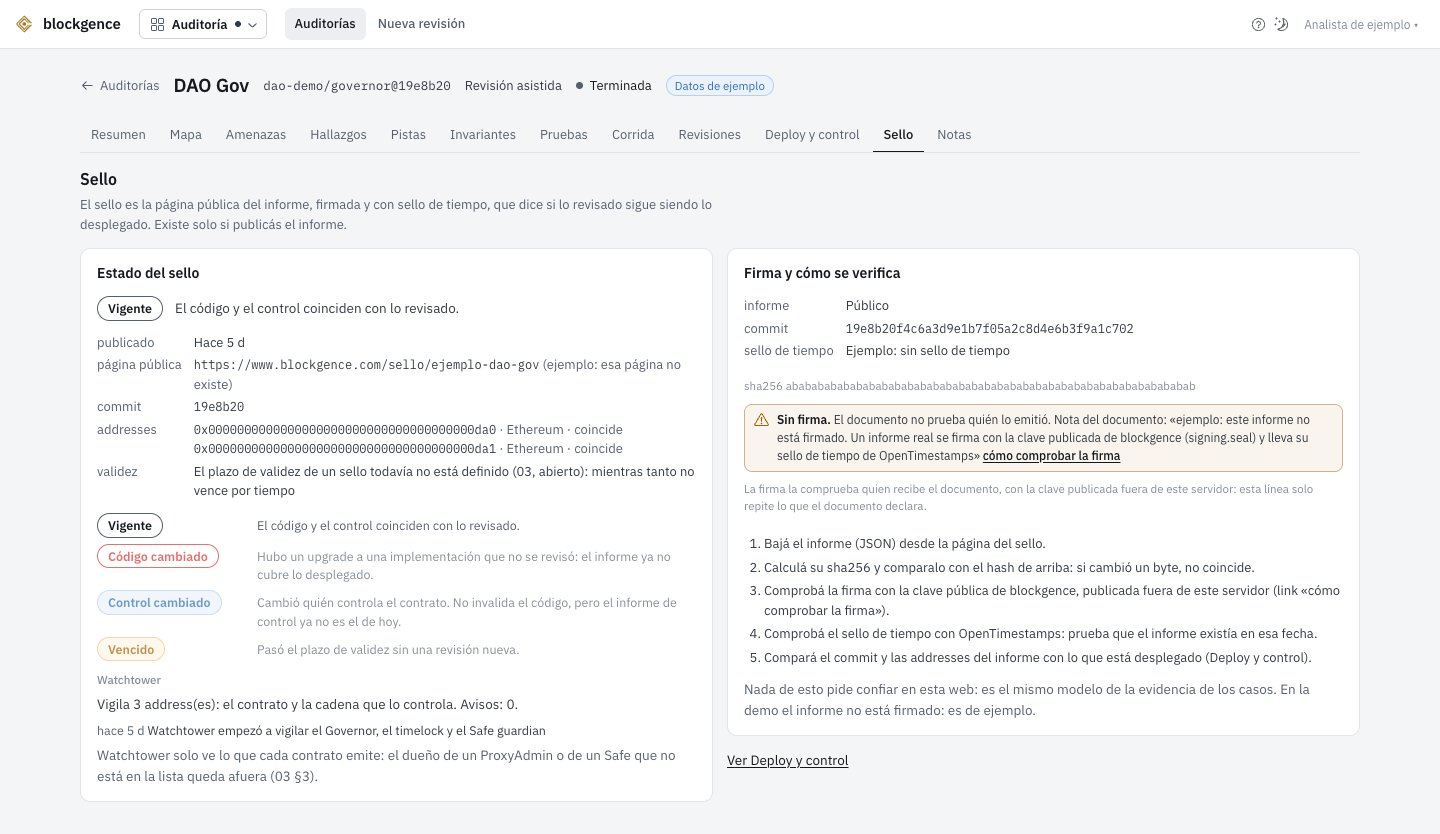
The Sello (seal) section of an example audit.
Through the API
note) are in Spanish. Each request about an audit accepts the optional X-Audit-Id header.
If it does not match the path, the response is 400 audit_id_mismatch. An audit from another organization gets the same
404 as one that does not exist. Audit routes do not charge credits. Details in the API reference.
What it does not cover
- A review is not a security guarantee. It covers the commit and the files in scope. Code, configuration, keys and integrations outside that scope are not reviewed.
- Automated tools do not catch most business-logic bugs.
- AI agents propose. A finding only counts with its proof (G1 to G4). Leads can be false, and the absence of findings does not prove there are no bugs.
- The report says which AI model was used and what each agent covered.
- Watchtower only sees what the contract emits: the owner of a ProxyAdmin or a Safe that was not registered is left out.